Buy something for a worker and take it off their pay
A mattress or a phone, bought now and paid back from later payments, like an instalment. Always shows what is left.
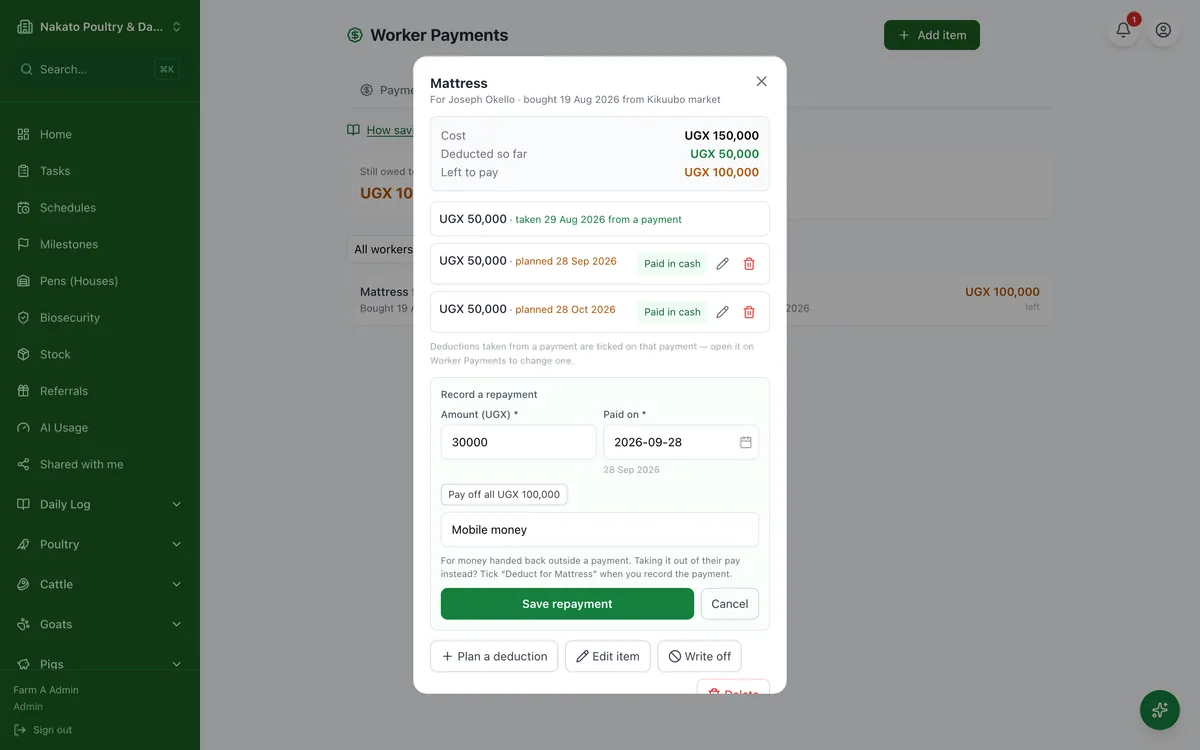
- Open Business → Workers → Items on credit and tap Add item.
- Pick the worker, say what it is and what it cost, and how it will be paid back — split into a few deductions, or a set amount each time. Add a photo of the item or its receipt if you like.
- No fixed plan? Choose Custom and list the repayments yourself, or leave it empty and record them as they come.
- Next time you pay that worker, tick Deduct for the item; the next amount is already filled in.
- Tap the item to see what is left. Worker paid some back, or paid it all off before leaving? Tap Record repayment and say what it was paid with: cash, mobile money, bank — or From savings, which takes it out of the savings the farm is holding for them. An item that will never be paid can be written off.
- Tap Statement on the item to print, save or send the worker what it cost, what has come off and what is left.
- Buying the item is not counted as an expense on its own — the wages it is paid back from already are. To count the purchase instead, switch it in Settings → Farm.