Read your Home page
Home shows how the farm is doing in money, what needs you today and your enterprises. What you see depends on your role.
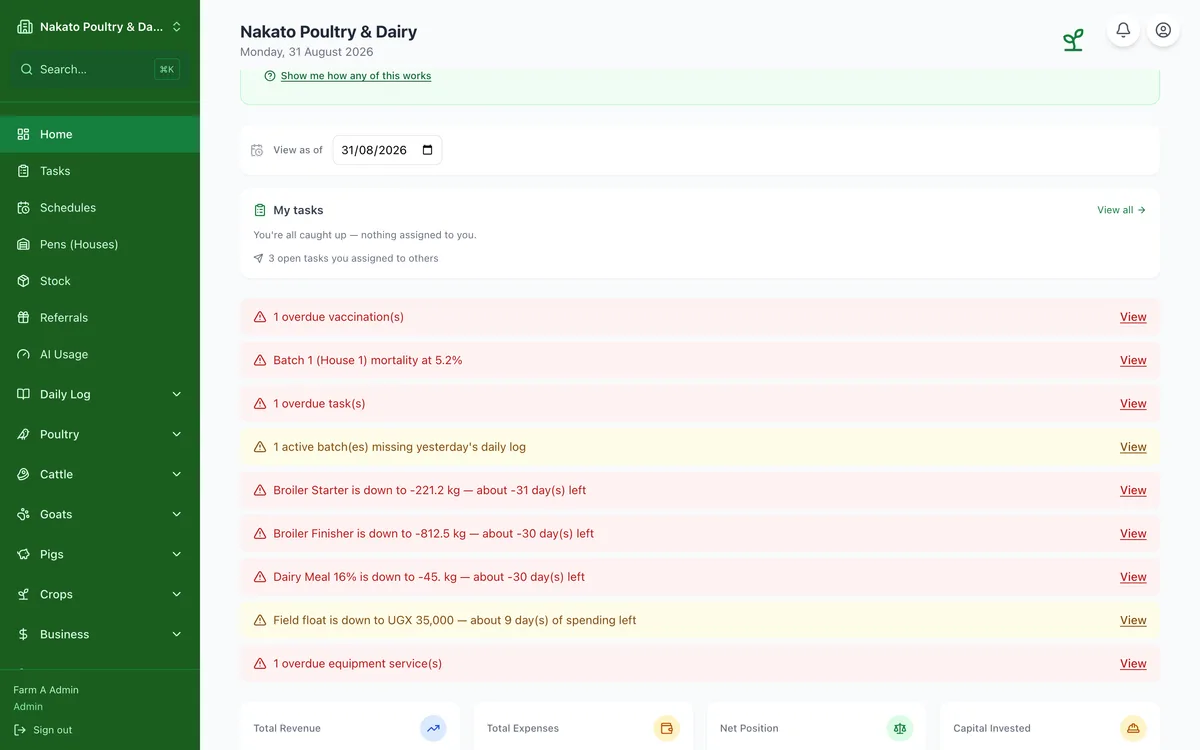
- Open Home. At the top is the money card. Net position is your revenue less your expenses. Revenue, Expenses and Capital sit under it.
- Capital is shown on its own. It is not taken off Net position.
- Tap Revenue, Expenses or Capital to open Money by Enterprise, if your role can see reports.
- Switch between 7 days, 30 days and All time. The coloured chip shows the change since the period before, of the same length. It is not shown when there is nothing to compare with.
- The small line is your net for each day. All time is the running total, so it has no line.
- If nothing was recorded in the last 30 days, the card opens on All time.
- To look back, tap the date at the top (View as of) and pick a day. The money and enterprise numbers show how things stood then. Tasks, alerts and milestones stay as they are today. Tap Today to come back.
- Needs attention lists what to deal with first, urgent ones first. Tap View to go to the record, or Ask AI to ask about it. Tap Show all to see the rest. If nothing is wrong it says All clear.
- Today shows My tasks and your upcoming milestones. Favourites are the records you starred.
- Your enterprises shows a card for each one with something recorded. The rest are under Set up more: tap one to start it.
- A strip near the bottom shows your setup progress, for example 6 of 7 done. Tap it to see the next steps.
- Seeing fewer figures than a colleague? Each person sees only what their role allows, and some roles get a simpler Home with quick links. Ask your admin if you need more.